
Learn how a WhatsApp ordering system for restaurants works, why it cuts delivery costs, and how to set one up for your business in 2026.
If you run a restaurant in a market where WhatsApp is already how customers communicate, chances are you’ve noticed something: people are already trying to order food through WhatsApp messages, even if you haven’t built anything to support it. They send a text, ask what’s available, place an order, and expect a reply, all through a chat window they already have open all day.
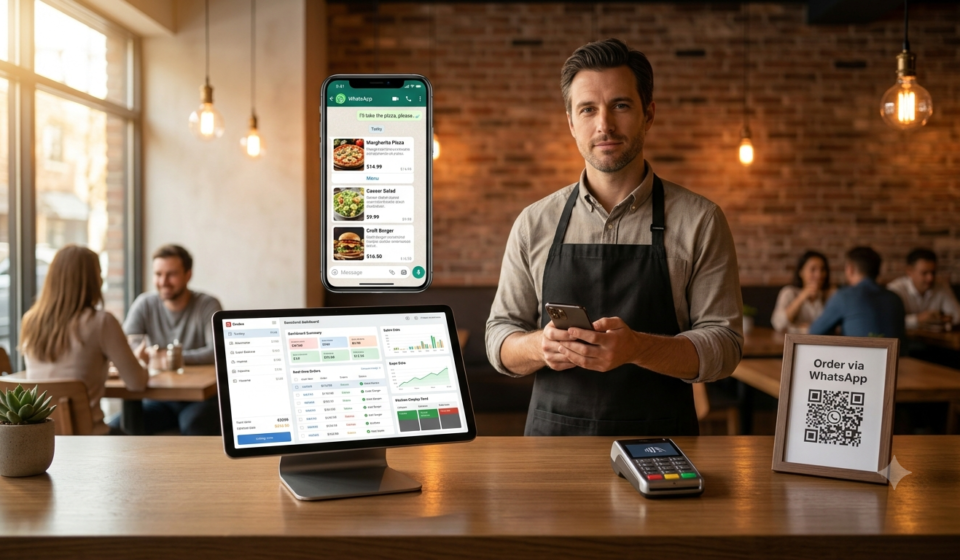
A WhatsApp ordering system for restaurants simply formalizes that behavior instead of fighting it. Rather than pushing customers toward a separate app they have to download or a delivery platform that takes a cut of every sale, you meet them where they already are.
This guide covers how these systems work, why they’ve become popular in markets like Nigeria, the Philippines, Kenya, and the UAE, and how to actually set one up.
Read More: Best POS System for Small Restaurants in 2026
What Is a WhatsApp Ordering System?
A WhatsApp ordering system lets customers browse a menu, place an order, and sometimes even pay, all inside a WhatsApp conversation, without leaving the app or downloading anything new. Depending on the sophistication of the system, this can range from:
- Manual ordering, where staff simply reply to WhatsApp messages by hand
- Semi-automated ordering, using WhatsApp’s catalog and quick-reply features
- Fully automated AI ordering, where a chatbot handles the entire conversation, from menu browsing to order confirmation, and pushes the order directly into your kitchen or POS system
The third option is where things get genuinely useful for a growing restaurant, since it removes the need for a staff member to be glued to a phone answering the same questions over and over.
Why WhatsApp Ordering Is Growing So Fast
A few forces are pushing restaurant owners toward WhatsApp-based ordering, especially outside North America and Western Europe:
1. WhatsApp is already the default communication channel. In many markets, WhatsApp isn’t just a messaging app, it’s how people talk to businesses, get updates, and even shop. Asking a customer to download a separate ordering app is friction they often won’t bother with.
2. Delivery app commissions are eating into margins. Third-party delivery platforms commonly take 15-30% commission per order. For a small restaurant already running on tight margins, that’s often the difference between a profitable order and a break-even one.
3. Customers prefer talking to a business, not tapping through menus. A chat-based ordering flow feels more natural for a lot of customers than navigating a rigid app interface, particularly for repeat customers who already know what they want.
4. It works on virtually any phone. Unlike a dedicated ordering app, WhatsApp ordering doesn’t require a smartphone with significant storage or a fast connection to download an app. This matters a lot in markets where customers are on a range of device types and network speeds.
Core Features to Look for in a WhatsApp Ordering System
Not all WhatsApp ordering tools are built the same way. Here’s what actually matters when evaluating one for your restaurant:
- AI-driven conversation handling — so orders don’t require a human to manually reply to every message, especially during peak hours
- Menu and pricing sync — changes to your menu should update automatically across WhatsApp, your POS, and any other ordering channels
- Order routing to your kitchen — the order needs to land on your kitchen display or printer without manual re-entry
- Payment integration — ideally supporting the payment methods your customers actually use locally, whether that’s cards, mobile money, or cash on delivery
- Customer history and repeat-order support — so returning customers can reorder quickly instead of repeating their entire order every time
- Credit and tab tracking — useful for restaurants that regularly extend credit to regular customers, which is common in many local markets
- Rider and delivery coordination — if you’re handling your own delivery rather than relying on third-party riders
How a WhatsApp AI Ordering Bot Actually Works
For restaurant owners unfamiliar with the mechanics, here’s a simplified walkthrough of how a well-built system typically handles a customer interaction:
- A customer sends a message to your restaurant’s WhatsApp number, either starting fresh or tapping a “message us” link from your social media or website
- The AI greets them and presents the menu, either as a WhatsApp catalog or a conversational list
- The customer selects items, and the AI confirms quantities, add-ons, or special requests
- The system calculates the total, including any delivery fee, and presents payment options
- Once confirmed, the order is pushed directly to your kitchen display or printer, and to your POS system for record-keeping
- If delivery is involved, the system can assign a rider and share tracking updates with the customer, all still within WhatsApp
The result is a checkout experience that feels like texting a friend, while running fully structured order data on the backend.
BillMatik’s Approach to WhatsApp Ordering
BillMatik was built with this exact problem in mind, particularly for restaurants in markets where WhatsApp already dominates customer communication.
What it offers specifically:
- AI-powered WhatsApp ordering that handles the full conversation, from menu questions to order confirmation, without requiring staff to manually respond to every message
- Direct integration with the rest of the restaurant OS, meaning WhatsApp orders flow straight into the same POS, kitchen display, and inventory system you’re already using, rather than existing as a separate disconnected channel
- Built-in credit and tab tracking, which matters for restaurants that extend informal credit to regular customers, a common practice that’s normally tracked in a notebook rather than a proper system
- Rider and delivery management, letting you fulfill your own deliveries directly through WhatsApp rather than routing every order through a third-party app and its commission structure
- Loyalty tracking, so repeat WhatsApp customers can be recognized and rewarded automatically rather than manually
Where it fits best: Small to mid-sized restaurants in markets like Nigeria, the Philippines, Kenya, and the UAE, where customers are already comfortable ordering through chat and where cutting delivery app commissions has a meaningful impact on monthly profit.
Where it’s less of a fit: Restaurants in markets where customers default to app-based ordering platforms rather than WhatsApp, or very large multi-location chains needing deep enterprise-level customization.
Comparing WhatsApp Ordering to Traditional Delivery Apps
| Factor | Third-Party Delivery Apps | WhatsApp Ordering System |
|---|---|---|
| Commission per order | Typically 15-30% | None, or a flat monthly software fee |
| Customer relationship | Owned by the platform | Owned by your restaurant |
| Setup effort | Usually just listing your menu | Requires initial setup and menu configuration |
| Customer reach | Access to the platform’s existing user base | Relies on your own customer base and marketing |
| Repeat customer data | Often limited or inaccessible to the restaurant | Fully visible and usable by the restaurant |
| Best for | New customer acquisition | Retaining and re-engaging existing customers |
In practice, most successful restaurants don’t fully abandon delivery apps, they use them for new customer discovery while shifting repeat orders toward direct channels like WhatsApp, where there’s no commission being taken on customers who already know and trust the restaurant.
How to Set Up a WhatsApp Ordering System for Your Restaurant
If you’re ready to implement one, here’s a practical rollout sequence:
- Choose a system that fits your scale. A very small operation might start with WhatsApp Business’s native catalog and manual replies, while a growing restaurant benefits more from a dedicated AI-powered system like BillMatik that removes manual response work entirely.
- Set up your digital menu. Make sure pricing, item names, and photos are accurate and consistent with your physical menu to avoid confusion.
- Test the ordering flow yourself. Place a few test orders as if you were a customer, checking for confusing steps or slow response times.
- Train your staff on the backend. Even with AI handling customer conversation, your kitchen and delivery staff need to understand how orders arrive and how to process them.
- Promote your WhatsApp number. Add it to your social media bios, in-store signage, and receipts so customers know it’s an option.
- Monitor and adjust. Track how many orders come through WhatsApp versus other channels, and refine your menu presentation or automated responses based on common customer questions.
Common Mistakes Restaurants Make With WhatsApp Ordering
- Treating it as a side channel instead of a real ordering system. If responses are slow or inconsistent, customers will go back to whatever app is more reliable, even if it costs you commission.
- Not connecting it to the kitchen workflow. If WhatsApp orders require manual re-entry into your POS, you lose most of the efficiency benefit and increase the chance of errors.
- Ignoring payment friction. If customers can’t pay through a method they’re comfortable with, cash on delivery, mobile money, or card, they may abandon the order.
- Failing to promote the channel. A WhatsApp ordering system only works if customers actually know it exists and how to use it.
Measuring Whether WhatsApp Ordering Is Actually Working
Once your system is live, it’s worth tracking a few specific numbers rather than just assuming it’s helping:
- Order volume through WhatsApp versus other channels, tracked weekly, to see if adoption is growing or stalling
- Average order value on WhatsApp orders compared to delivery app orders, since direct channels sometimes see higher averages from repeat customers who order more confidently
- Repeat customer rate, since one of the biggest advantages of WhatsApp ordering is that you retain the customer relationship and can re-engage them directly
- Response time during peak hours, especially if you’re still handling some conversations manually alongside automation
- Net savings from reduced delivery app commissions, calculated against whatever monthly cost you’re paying for the WhatsApp ordering system itself
Most restaurants that track these numbers find the biggest gains show up in the second or third month, once customers have shifted their habit from calling or using a delivery app to simply messaging the restaurant directly.
Read More: Restaurant Credit Sales: How to Track Who Owes You Money
Should Every Restaurant Use WhatsApp Ordering?
Not necessarily. A few situations where it makes less sense:
- Markets where customers overwhelmingly prefer app-based ordering rather than chat-based communication
- Very high-volume quick-service restaurants where the speed of an in-store kiosk or counter order outpaces a chat-based flow
- Restaurants without reliable staff or automation to handle response times, since slow replies can hurt the customer experience more than not offering WhatsApp ordering at all
For most small to mid-sized restaurants in markets where WhatsApp is already central to how customers communicate, though, the case is strong: lower fees, direct customer relationships, and a channel customers already trust and use daily.
Frequently Asked Questions
Do I need WhatsApp Business or can I use a regular WhatsApp account? WhatsApp Business is strongly recommended, since it supports business profiles, catalogs, and automated messaging features that a regular personal account doesn’t offer.
Is WhatsApp ordering only useful for delivery, or does it work for dine-in too? It works well for both. Some restaurants use it purely for delivery and takeaway, while others use it for dine-in customers to place orders from their table without waiting for staff.
How much does a WhatsApp AI ordering system typically cost? Pricing varies widely depending on the provider and feature set, but most dedicated systems charge a flat monthly fee rather than a per-order commission, which is usually far cheaper than third-party delivery app fees once order volume grows.
Can a WhatsApp ordering system replace my POS entirely? Not usually, and it typically shouldn’t. The most effective setups integrate WhatsApp ordering directly with your existing POS and kitchen workflow, rather than treating it as a fully separate system.
Final Thoughts
A WhatsApp ordering system for restaurants isn’t just a trendy add-on, it’s a direct response to two things that matter a lot to small restaurant owners: how customers already prefer to communicate, and how much of each order gets eaten up by third-party commissions. If your customers are already messaging you on WhatsApp to ask about your menu, that’s usually a strong signal it’s worth formalizing the process rather than letting it stay ad hoc.
Whether you start with WhatsApp Business’s basic tools or move straight to a fully automated AI system like BillMatik, the goal is the same: make ordering as easy as sending a text, without losing a third of every sale to a delivery platform.
WhatsApp ordering system for restaurantsWhatsApp ordering system for restaurantsWhatsApp ordering system for restaurantsWhatsApp ordering system for restaurantsWhatsApp ordering system for restaurantsWhatsApp ordering system for restaurantsWhatsApp ordering system for restaurantsWhatsApp ordering system for restaurantsWhatsApp ordering system for restaurantsWhatsApp ordering system for restaurantsWhatsApp ordering system for restaurantsWhatsApp ordering system for restaurantsWhatsApp ordering system for restaurantsWhatsApp ordering system for restaurantsWhatsApp ordering system for restaurantsWhatsApp ordering system for restaurantsWhatsApp ordering system for restaurantsWhatsApp ordering system for restaurants