
Discover the best budgeting apps for beginners in 2026. Compare free and paid options, features, and pricing to find the perfect app to take control of your finances.
Taking the First Step Toward Financial Freedom
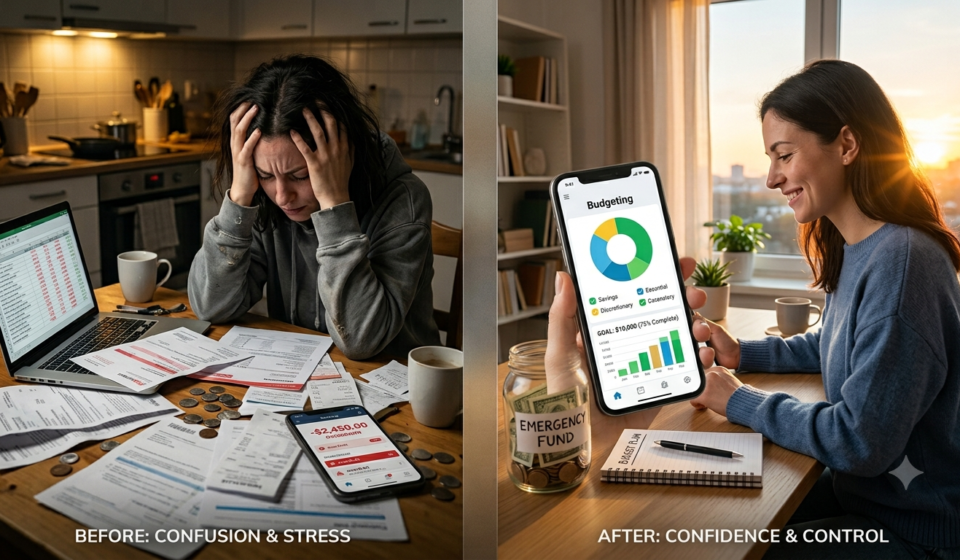
Let’s be honest. Budgeting can feel overwhelming. The spreadsheets, the categories, the tracking—it all seems like a second job. And for many beginners, the fear of getting it wrong is enough to stop them from even starting.
But here is the truth: you don’t need to be a finance expert to take control of your money. In 2026, the best budgeting apps for beginners are designed to do the heavy lifting for you. They automatically track your spending, categorize your transactions, and show you exactly where your money is going—all with a few taps on your phone.
The statistics are sobering. According to a CNBC affordability survey, 59% of Americans say they are living paycheck to paycheck . That means more than half of us are struggling to make ends meet. But here is the good news: while a budgeting app won’t increase your income, it can change what you do with the money you have .
This guide will walk you through the best budgeting apps for beginners in 2026. We will cover free and paid options, explain different budgeting methods, and help you find the app that fits your lifestyle. Whether you are a student, a new graduate, or someone who has never budgeted before, there is an app here for you.
Part 1: Why Beginners Need a Budgeting App
Before we dive into the apps themselves, let’s understand why budgeting apps are so valuable for beginners.
1.1 Automatic Tracking
One of the biggest barriers to budgeting is the sheer effort of tracking every expense. Budgeting apps solve this by automatically connecting to your bank accounts and categorizing your transactions . You don’t need to manually enter every coffee purchase—the app does it for you.
1.2 Instant Visibility
Most budgeting apps tell you where your money went, but the best ones help you plan before you spend . They give you a real-time view of your finances, showing you exactly how much you have left to spend in each category.
1.3 Goal Setting
Whether you are saving for a vacation, paying off debt, or building an emergency fund, budgeting apps help you set and track financial goals . Seeing your progress can be incredibly motivating.
1.4 Financial Education
Many apps offer educational content, tips, and insights that help you understand your spending patterns and make better financial decisions .
Read More: How to Save Money on a Tight Budget: 20 Proven Strategies for 2026
Part 2: The Best Budgeting Apps for Beginners at a Glance
Here is a quick overview of the top budgeting apps for beginners in 2026:
Part 3: The Best Budgeting Apps for Beginners – Detailed Reviews
3.1 Spendee – Best for Absolute Beginners
If you have never used a budgeting app before, Spendee is an excellent place to start. According to Forbes, Spendee made their list as the best budgeting app for beginners, offering a straightforward way to manage finances with a simple design and intuitive interface . USAToday also ranks Spendee as the best for simple or beginner budgeting .
- Best For: People who want a clean, uncomplicated introduction to budgeting.
- Key Features:
- Simple, visual interface
- Automatic transaction categorization
- Budget tracking and spending insights
- Free Plan: Yes
- Platforms: iOS, Android
3.2 EveryDollar – Best for Zero-Based Budgeting Beginners
EveryDollar is based on Dave Ramsey’s zero-based budgeting principles . The core idea is simple: every dollar you earn should have a “job”—whether that is bills, savings, or spending .
According to Forbes, EveryDollar has a user-friendly interface that makes it easy to navigate and offers unlimited budget categories and insights into spending trends . It is also a great option if you prefer to manually enter expenses rather than linking your bank account .
- Best For: Beginners who want to try zero-based budgeting without a steep learning curve.
- Key Features:
- Zero-based budgeting approach
- Unlimited budget categories
- Spending trend insights
- Manual entry option available
- Free Plan: Yes (manual entry)
- Paid Pricing: $17.99/month or $79.99/year
- Platforms: Web, iOS, Android
3.3 Rocket Money – Best for Finding Hidden Savings
Rocket Money scored the highest in USAToday’s comprehensive ranking, earning the most points overall based on value, reviews, features, and support . What makes Rocket Money stand out is its focus on helping you identify and reduce expenses.
The app’s concierge service helps you identify and cancel unwanted subscriptions directly in the app . It also offers bill negotiation—the team can reach out to service providers on your behalf to try and lower your bills .
- Best For: People who want to find and eliminate hidden expenses.
- Key Features:
- Free Plan: Yes, with basic budgeting tools
- Paid Pricing: $7–$14/month
- Platforms: iOS, Android
Read More: Loyverse POS Review 2026: What It’s Missing (and What to Use Instead)
3.4 Empower – Best Completely Free Budgeting App
If you want a budgeting app that is truly free with no paid upgrade required, Empower (formerly Personal Capital) is an excellent choice. USAToday ranks Empower as the best for free budgeting.
Empower offers a free Budgeting & Cash Flow tool alongside portfolio analysis, net worth tracking, a retirement planner, and a savings planner—all at no cost. It connects your accounts and categorizes transactions automatically, making it easy to see where your money goes each month .
- Best For: People who want a comprehensive free budgeting and investing tool.
- Key Features:
- Budgeting and cash flow tracking
- Net worth tracking
- Retirement planning
- Investment portfolio analysis
- Free Plan: Completely free
- Platforms: Web, iOS, Android
3.5 PocketGuard – Best for Automated Budgeting
PocketGuard is designed to answer one simple question: “How much money can I safely spend today?” It shows you one number—what is genuinely free to spend right now . This makes it incredibly easy for beginners to avoid overspending.
According to Forbes, PocketGuard is the best budgeting app for tracking spending. USAToday ranks it as the best for automated budgeting.
- Best For: People who want a simple, automated way to track spending.
- Key Features:
- Shows “in your pocket” spending limit
- Automatic transaction categorization
- Bill tracking
- Free Plan: Yes
- Paid Pricing: Subscription
- Platforms: iOS, Android
3.6 Goodbudget – Best for the Envelope Method
Goodbudget is a budgeting app built around the envelope method, a system where you divide your income into categories at the start of each month and only spend what you have allocated to each one . It is a useful budgeting app for beginners, requiring the user to manually create envelope categories to track expenses .
You are able to connect your bank accounts, and transactions sync automatically, but the app does not create customized plans for spending and paying off debt . If you prefer to manually enter your expenses without linking your bank account, Goodbudget is a great option .
- Best For: People who like the envelope budgeting method.
- Key Features:
- Digital envelope system
- Manual expense entry (or bank sync)
- Shared budgets across devices
- Free Plan: Yes
- Platforms: Web, iOS, Android
3.7 You Need A Budget (YNAB) – Best for Changing Spending Habits
YNAB (You Need A Budget) is widely considered one of the most effective budgeting apps for people who genuinely want to change their financial behavior . Unlike most budgeting apps that tell you where your money went, YNAB asks you to decide where each dollar is going before you spend it.
Its zero-based approach, which is built around the idea that every dollar should have a purpose, is designed to close the gap between what you earn and what you actually have left over at the end of the month . YNAB is used by over 205,000 people .
- Best For: People who are serious about changing their spending habits and breaking the paycheck-to-paycheck cycle .
- Key Features:
- Free Plan: 34-day free trial (college students get 12 months free)
- Paid Pricing: $14.99/month or $109/year ($9.08/month)
- Platforms: iOS, Android, Web
3.8 Cleo – Best for Beginners and Gen Z
Cleo is a budgeting app with a personality. It uses an AI chatbot to help you track spending, set budgets, and save money . The app is designed to be engaging and accessible, making it particularly popular with younger users and beginners .
- Best For: People who want a fun, engaging way to budget.
- Key Features:
- Free Plan: Yes
- Paid Pricing: $5.99–$14.99/month
- Platforms: iOS, Android
3.9 Honeydue – Best for Couples and Households
If you are budgeting with a partner or roommate, Honeydue is designed specifically for you. USAToday ranks Honeydue as the best for couples or household tracking. It allows you to share budgets, track joint expenses, and see your combined financial picture .
- Best For: Couples and households managing finances together.
- Key Features:
- Shared budgeting
- Joint expense tracking
- Combined financial overview
- Free Plan: Yes
- Platforms: iOS, Android
3.10 Quicken Simplifi – Best for Forward-Looking Planning
Quicken Simplifi is designed to give you a forward-looking view of your finances—not just a report on what already happened . The Spending Plan automatically builds your monthly budget from your actual income and bills, showing you at any point in the month exactly what is left to spend, save, or invest .
What sets Simplifi apart is its Projected Cash Flows feature, which shows your future account balances—including upcoming paychecks, bills, and seasonal expenses . This is particularly useful for planning ahead for expenses like holiday spending, annual insurance renewals, and property taxes .
- Best For: People who want to plan for seasonal and future expenses.
- Key Features:
- Free Plan: No
- Paid Pricing: $3.99/month (billed annually)
- Platforms: Web, iOS, Android
3.11 Wallet by BudgetBakers – Best for International Budgets
Wallet by BudgetBakers is a great option if you manage money in multiple currencies or travel frequently. It made Forbes’ list as the best budgeting app for cash flow monitoring. The app automatically categorizes your spending and provides a clear overview of your cash flow for the month .
- Best For: People who need multi-currency support.
- Key Features:
- Multi-currency support
- Automatic transaction categorization
- Cash flow monitoring
- Free Plan: Yes
- Platforms: Web, iOS, Android
3.12 Monarch Money – Best for Flexible, Customizable Budgeting
Monarch Money is a strong choice for people who want flexibility. You can choose between flex and category budgeting strategies and customize your dashboard to focus on specific areas of your finances . Forbes named Monarch Money as the best app to replace Mint after Mint shut down in March 2024 .
- Best For: People who want a customizable budgeting experience.
- Key Features:
- Free Plan: Free trial
- Paid Pricing: Subscription
- Platforms: Web, iOS, Android
Part 4: Budgeting Methods Explained
To choose the right app, it helps to understand the different budgeting methods available. Here are the most common approaches:
4.1 Zero-Based Budgeting
Every dollar you earn is assigned a specific job—bills, savings, investments, or discretionary spending. At the end of the month, your income minus your expenses should equal zero .
4.2 The 50/30/20 Rule
This simple framework divides your after-tax income into three categories:
- 50% for needs: Housing, food, utilities, transportation
- 30% for wants: Dining out, entertainment, shopping
- 20% for savings and debt repayment
- Best Apps: Many apps support this method, including Quicken Simplifi
4.3 The Envelope Method
You divide your cash into physical or digital “envelopes” for different spending categories. Once an envelope is empty, you cannot spend any more in that category for the month .
- Best Apps: Goodbudget
4.4 The “In Your Pocket” Method
This approach focuses on one simple number: how much money you have left to spend after accounting for bills, savings, and goals .
Part 5: Free vs. Paid – What Do You Actually Get?
One of the most common questions beginners ask is whether they need to pay for a budgeting app. The answer depends on your needs.
5.1 What You Get for Free
Many of the best budgeting apps for beginners offer generous free tiers that are genuinely useful . Free versions typically include:
- Automatic transaction categorization
- Basic budget tracking
- Spending insights
- Goal setting
Best Free Options: Empower (completely free), Rocket Money (free tier), EveryDollar (free manual entry), Goodbudget (free), PocketGuard (free)
5.2 What You Get with Paid Versions
Paid upgrades typically unlock:
- Unlimited budget categories
- Custom categories and tags
- Subscription cancellation services
- Bill negotiation
- Advanced reporting and insights
- Bank synchronization (for apps where it’s not free)
5.3 When to Consider Paying
If you find yourself consistently struggling with your finances and need more structure, a paid app like YNAB (which has no free version but offers a 34-day trial) might be worth the investment . YNAB is designed to help you break the paycheck-to-paycheck cycle, which can save you far more than the subscription cost .
Part 6: Tips for Beginners – How to Make Budgeting Stick
Downloading an app is the easy part. Sticking with it is where most people struggle. Here are tips to help you succeed:
6.1 Start Simple
Don’t try to track every single category in minute detail from day one. Start with broad categories (e.g., “Bills,” “Food,” “Transportation,” “Fun”) and refine as you go.
6.2 Be Honest About Your Spending
Your budget should reflect reality, not wishful thinking. If you spend $200 a month on coffee, budget for it. You can’t fix what you don’t acknowledge.
6.3 Check In Daily
Make it a habit to open your budgeting app every day. Even just 2 minutes a day can help you stay aware of your spending.
6.4 Don’t Give Up After a Slip
Everyone overspends occasionally. Don’t let one mistake derail your entire budgeting effort. Acknowledge it, adjust, and move on.
6.5 Celebrate Small Wins
Did you stay under budget this week? Did you save an extra $20? Celebrate these small victories. They add up.
6.6 Use the 30-Day Rule
For non-essential purchases over a certain amount, wait 30 days. If you still want it after 30 days, consider buying it. This helps curb impulse spending.
Part 7: Privacy and Security Considerations
When using a budgeting app, you are sharing sensitive financial information. Here are important considerations:
7.1 Bank-Level Encryption
Most reputable budgeting apps use bank-level encryption to protect your data .
7.2 Read the Privacy Policy
Understand how your data is used. Some apps may share anonymized data with third parties.
7.3 Manual Entry Option
If you are uncomfortable linking your bank accounts, many apps offer manual entry options . Goodbudget, EveryDollar, PocketGuard, and Honeydue allow you to manually enter your expenses .
7.4 Two-Factor Authentication
Enable two-factor authentication whenever possible for an extra layer of security.
Part 8: How to Choose the Right App for You
With so many options, how do you choose? Here is a simple decision framework:
Step 1: Identify Your Primary Need
- Need simplicity? → Spendee or PocketGuard
- Want to find hidden subscriptions? → Rocket Money
- Want a completely free comprehensive tool? → Empower
- Like the envelope method? → Goodbudget
- Want to change spending habits? → YNAB
- Budgeting with a partner? → Honeydue
- Need multi-currency support? → Wallet by BudgetBakers
- Prefer manual entry? → EveryDollar, Goodbudget, or PocketGuard
Step 2: Start Free
Most apps offer free tiers. Start with the free version and see if it meets your needs before paying.
Step 3: Try Before You Commit
For paid apps like YNAB, take advantage of free trials . YNAB offers a 34-day free trial with no credit card required .
Step 4: Stick with It for 30 Days
Commit to using your chosen app for 30 days. This is enough time to form a habit and see real results.
Conclusion: Your Financial Journey Starts Today
Taking control of your finances doesn’t have to be complicated. The best budgeting apps for beginners in 2026 are designed to make budgeting simple, intuitive, and even enjoyable. Whether you choose the simplicity of Spendee, the zero-based approach of EveryDollar, the subscription-savvy Rocket Money, or the comprehensive free features of Empower, the most important step is to start.
Remember: budgeting is not about restriction. It is about freedom. It is about knowing where your money is going so you can make intentional choices about where you want it to go. It is about breaking the paycheck-to-paycheck cycle and building a financial future you can be proud of.
Start small. Pick one app from this list. Commit to using it for 30 days. And watch as your relationship with money transforms.
Because the best time to start budgeting was years ago. The second best time is right now.
Frequently Asked Questions (FAQ)
1. What is the best budgeting app for absolute beginners?
Spendee is widely recognized as the best budgeting app for beginners due to its simple design and intuitive interface . EveryDollar is also excellent for beginners who want to try zero-based budgeting .
2. Are there completely free budgeting apps?
Yes. Empower offers a comprehensive free budgeting tool with no paid upgrade required . Rocket Money, Goodbudget, PocketGuard, and EveryDollar (manual entry) also offer generous free tiers .
3. Do I need to link my bank account?
No. Many apps offer manual entry options. Goodbudget, EveryDollar, PocketGuard, and Honeydue allow you to manually enter your expenses without linking your bank account .
4. Which app is best for paying off debt?
YNAB (You Need A Budget) is specifically designed to help users pay off debts and break the paycheck-to-paycheck cycle . Its zero-based approach ensures every dollar is accounted for.
5. Can I use these apps with my partner?
Yes. Honeydue is specifically designed for couples and households . YNAB also allows one subscription to cover up to six people .
6. What happened to Mint?
Mint shut down in March 2024 . Monarch Money is considered the best app to replace Mint .
7. How much does YNAB cost?
YNAB costs $14.99 per month or $109 per year ($9.08 per month) . They offer a 34-day free trial (college students get 12 months free) .
8. Which app is best for saving money?
Rocket Money helps you find and cancel unwanted subscriptions and negotiate bills . YNAB helps you proactively assign every dollar to a purpose, including savings .